
How to Create Your Own AI Development Team (Because Humans Are Overrated)
Ever thought, « I wish software development involved fewer meetings, Slack notifications, and zero office politics »? You’re not alone. I’ve recently experimented with building an AI-driven software development team using Python, Microsoft’s AutoGen, and Ollama for local AI models.
In this guide, I’ll walk you step-by-step through setting up your very own AI-powered coding team. By the end, you’ll have an AI squad that can handle tasks—from creating functional apps to (hopefully) impressing your coworkers.
🚀 Step 1: Clone the Repository
git clone https://github.com/Tarekivida/ai_development_team.git
cd ai_development_team
🐍 Step 2: Set Up Python Environment
python -m venv .venv
source .venv/bin/activate  # (use .venv\Scripts\activate on Windows)
pip install typing_extensions spotipy
🧩 Step 3: Install AutoGen
pip install pyautogen
🦙 Step 4: Install and Run Ollama (Local Model)
On Mac/Linux:
curl -fsSL https://ollama.com/install.sh | sh
On Windows:
Download and install from ollama.com.
Then start Llama 3 locally:
ollama run llama3
🛠️ Step 5: Configure AI Models
Modify the file utils/llm_configs.py as follows:
import os

llm_config = {
    "config_list": [
        {
            "model": "llama3.1:8b",
            "base_url": "http://localhost:11434",
            "api_key": "NotRequired",
            "price": [0, 0],
        },
        {
            "model": "gpt-4",
            "api_key": os.environ['OPENAI_API_KEY'],
        }
    ],
    "cache_seed": None,
}
For GPT-4, set your API key:
export OPENAI_API_KEY='your_api_key_here'
🤖 Step 6: Meet Your AI Team
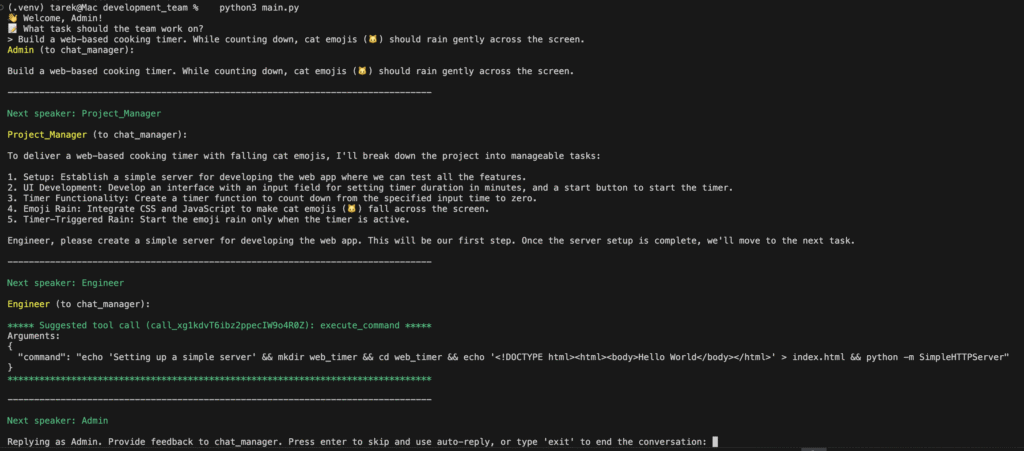
Your AI team has three agents:
- Admin (You): You set the rules and enjoy feeling important.
- Project Manager (AI): Breaks down complex tasks without ever scheduling pointless meetings.
- Engineer (AI): Tirelessly writes code without asking for vacation.
Check out an example definition (main.py):
engineer = AssistantAgent(
    name="Engineer",
    llm_config=llm_config,
    system_message="""
    I'm a dedicated software engineer agent writing code exactly as requested by the Project Manager.
    """
)
📁 Step 7: Allow Your Engineer to Create Files
Let the AI safely create and modify files in the ./output directory:
@engineer.register_for_llm(description="Create a new file with code.")
def create_file_with_code(filename: str, code: str):
    with open(default_path + filename, "w") as file:
        file.write(code)
    return 0, "File created successfully"
🐱 Step 8: Run Your AI Development Team (Fun Example)
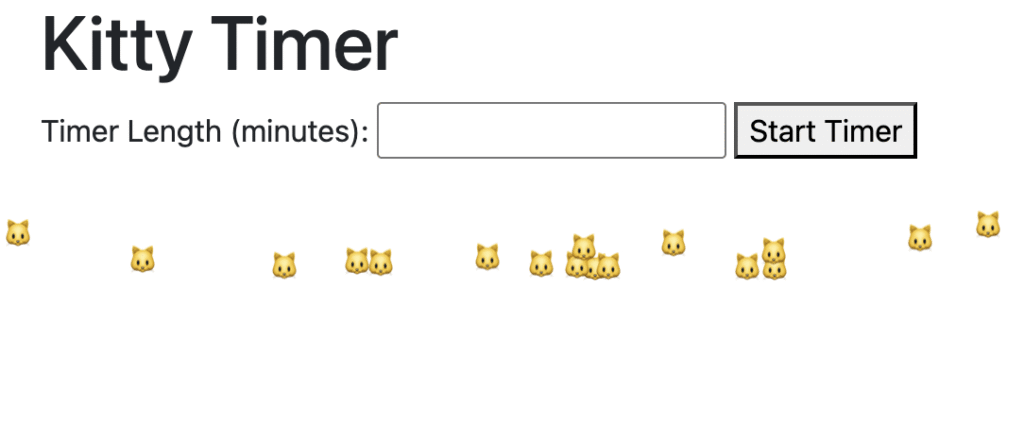
Let’s give our AI a playful first task: creating a web cooking timer that counts down while raining cat emojis 🐱 across the screen.
python main.py
Then enter this instruction:
📝 What task should the team work on?
> Build a web-based cooking timer. While counting down, cat emojis (🐱) should rain gently across the screen.
Sit back and watch your AI team build something weirdly useful and charming.
📌 Step 9: Check the Results
Your team’s output will appear in the ./output folder. Feel free to pretend it was all your work.
🚧 What’s Next?
Here’s how you might level up your AI team:
- Add a Tester Agent: Catches bugs your Engineer claims don’t exist.
- Automate Git commits: Because green GitHub squares are the real currency of developer prestige.
- Add memory: So your team remembers past mistakes—without holding grudges (we hope).
🤔 Final Thoughts: Can AI Replace Human Developers?
Not yet. Humans still lead in creativity, nuance, and blaming the intern when things go wrong.
But AI can handle routine tasks, freeing developers to focus on creative problems—and that’s exactly why I built this project.
🎯 Check it out on GitHub: AI Development Team
Happy coding, and may your AI teammates never discover salary negotiations.
– Tarek
One thought on “How to Create Your Own AI Development Team (Because Humans Are Overrated)”