
Testing SHAP-E on Google Colab: Promising Tech, Disappointing Results

I recently tested OpenAI’s SHAP-E, the AI model that generates 3D assets from text prompts, using Google Colab. I had high hopes — but so far, the results have been underwhelming.
You can find my test notebook here:
👉 tarekivida/super-duper-rotary-phone
🧪 The Setup
Getting started was fairly smooth. I simply cloned the repo, installed it, and followed the basic setup steps:
bashCopyEdit!git clone https://github.com/openai/shap-e
%cd shap-e
!pip install -e .
Then, I imported the libraries and loaded the models:
pythonCopyEditimport torch
from shap_e.diffusion.sample import sample_latents
from shap_e.diffusion.gaussian_diffusion import diffusion_from_config
from shap_e.models.download import load_model, load_config
from shap_e.util.notebooks import create_pan_cameras, decode_latent_images, gif_widget, decode_latent_mesh

device = torch.device('cuda' if torch.cuda.is_available() else 'cpu')

xm = load_model('transmitter', device=device)
model = load_model('text300M', device=device)
diffusion = diffusion_from_config(load_config('diffusion'))
For the first test, I used a simple, clear prompt, inspired by SHAP-E’s own examples:
« a low poly fox »
Here’s the code I ran to sample and render:
pythonCopyEditbatch_size = 1
guidance_scale = 15.0
prompt = "a low poly fox"

latents = sample_latents(
    batch_size=batch_size,
    model=model,
    diffusion=diffusion,
    guidance_scale=guidance_scale,
    model_kwargs=dict(texts=[prompt] * batch_size),
    progress=True,
    clip_denoised=True,
    use_fp16=True,
    use_karras=True,
    karras_steps=4,
    sigma_min=1e-3,
    sigma_max=160,
    s_churn=0,
)

render_mode = 'nerf'  # you can change this to 'stf'
size = 64  # higher values take longer to render

cameras = create_pan_cameras(size, device)
for i, latent in enumerate(latents):
    images = decode_latent_images(xm, latent, cameras, rendering_mode=render_mode)
    display(gif_widget(images))
Finally, to export the 3D models:
pythonCopyEditfor i, latent in enumerate(latents):
    t = decode_latent_mesh(xm, latent).tri_mesh()
    with open(f'example_mesh_{i}.ply', 'wb') as f:
        t.write_ply(f)
    with open(f'example_mesh_{i}.obj', 'w') as f:
        t.write_obj(f)
🐢 Performance on Google Colab: Painfully Slow
Even with a GPU enabled in Google Colab, generation was very slow.
- Sampling latents took several minutes.
- Rendering and decoding took even longer.
When using a low karras_steps value (4), it still took around 30 minutes per generation.
When I tried karras_steps = 64, each step took about 10 minutes, meaning the notebook would timeout before completing. 🐌
Clearly, free-tier Colab isn’t suited for anything beyond basic quick tests.
🙈 The Output: Not What I Expected
The biggest disappointment: the generated 3D models looked nothing like a low poly fox.
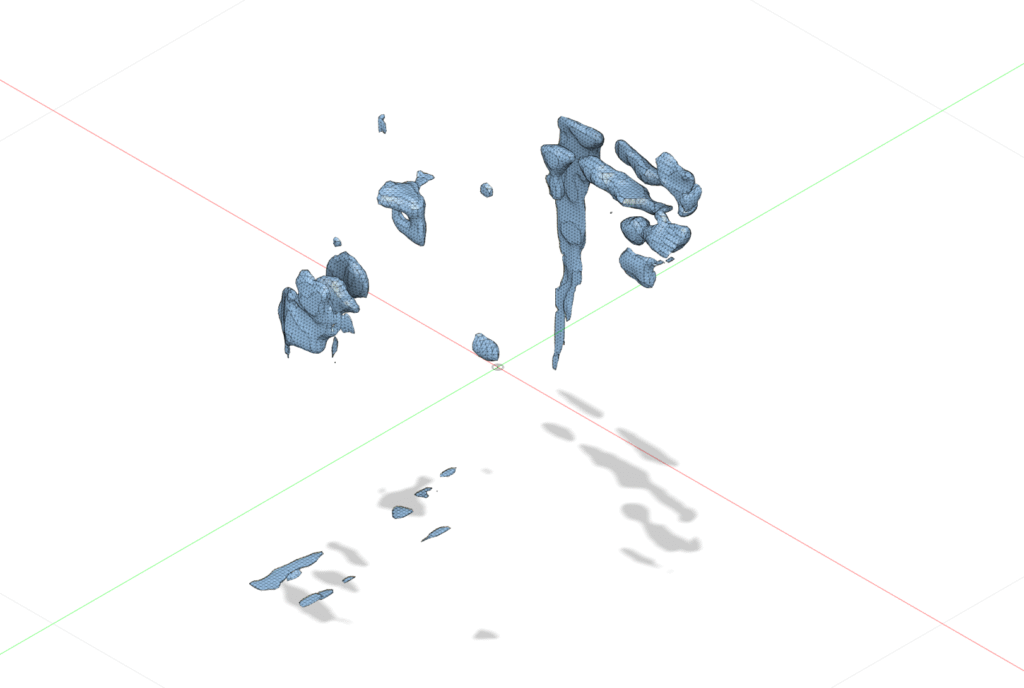
Instead, I got abstract, noisy blobs with no recognizable shape or structure.
It took over an hour to get something — and even then, it wasn’t usable for 3D printing or serious modeling.
In short:
- Long wait.
- Strange, messy output.
- Very little usable payoff.
🧯 Is It User Error?
To be fair, some of the bad results might be my fault:
- Maybe my text prompt was too vague.
- Maybe I needed to fine-tune parameters like
guidance_scale,clip_denoised, ors_churn. - Maybe Colab’s weak GPU is simply not enough for good SHAP-E results.
There’s a lot of hyperparameters that I haven’t fully optimized yet, and SHAP-E is still more a research tool than a plug-and-play solution.
If you’re experienced with SHAP-E and have tips for better settings or tricks — please share! 🙏
2 thoughts on “Testing SHAP-E on Google Colab: Promising Tech, Disappointing Results”